







More 5★ Google reviews — without asking every client
An automatic review request after the service is completed.
Sound familiar?
Happy clients drive off, but hardly any of them leaves a review.
It feels awkward to ask for a review at pick-up, so in the end you don’t ask at all.
You only learn a client was unhappy from a one-star review on Google.
The studio down the road has more reviews and ranks higher on Google Maps.
Once the order is settled, the system sends the client a short survey: 5★ leads to Google, lower ratings stay in the CRM so you can react.
Try it free for 14 daysWhat is this feature?
A fully automated rating request after the service is completed. Happy customers are directed to Google, while lower ratings stay in the system — so you can react before they become public.
How does it work in practice?
After an order is settled, the customer receives a 1–5 survey. 5★ triggers a link to Google, while the remaining ratings stay in the CRM for the owner/manager to review and respond to quickly.
SMS survey
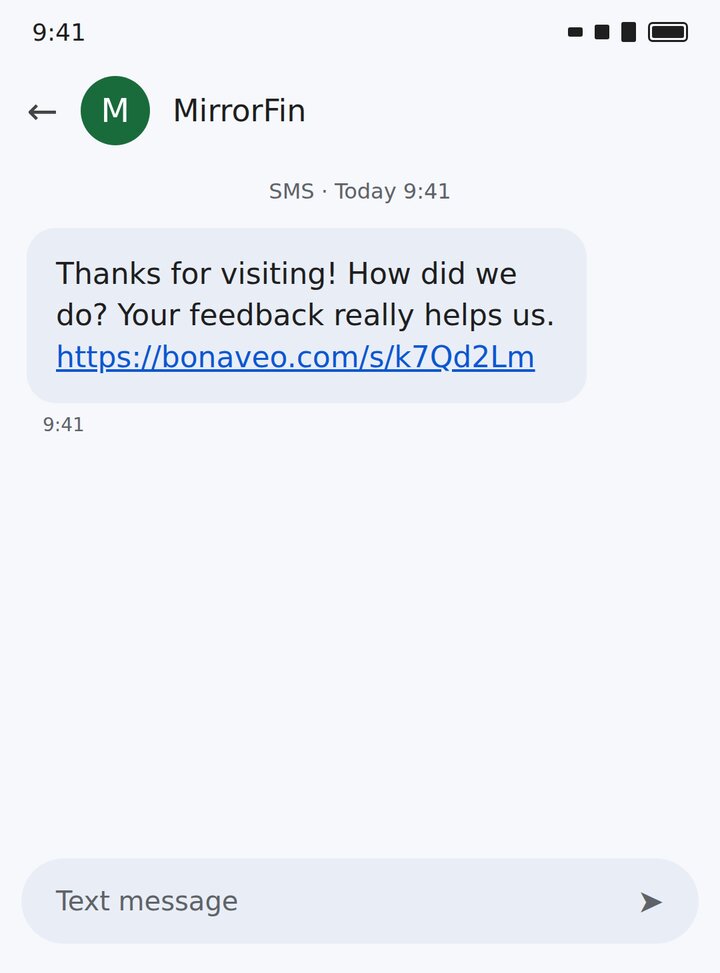
Short, mobile and effective. Sent the moment the service is settled — with no delay.
We land on Google
For positive reviews, the system automatically says thank you and asks the customer to leave them on Google.
Ratings below 5★ stay in the system only
You see the rating and comment in the CRM. You can call back, fix the experience and close the matter.
Reports and trends
Average rating, number of reviews and trends over time — better operational and marketing decisions.
What does it look like in the system?
An automatic SMS message asking for a review after the service is completed.
Join more than 50 studios working with Bonaveo
Average Google rating of 5.0. The first 14 days are free, no card needed.
What do you gain?
Reviews drive sales and visibility on Google. Automation removes friction: less manual work, more reviews and control over reputational risk.
More reviews
A steady inflow of reviews without involving the team.
Higher average
5★ goes public, the rest — to an internal response.
Fast intervention
You react before dissatisfaction turns into a Google review.
Full automation
It works after settlement — with no extra clicks.
Better ranking
More fresh reviews = better visibility in Google Maps.
Related system features
The review request works best together with these modules of the CRM for auto detailing.
Frequently asked questions
How does the feedback request work?
After an order is settled, the system sends a 1–5 survey. 5★ leads to Google, lower ratings go to the internal panel.
Do I have to send anything manually?
No. The system detects the settlement moment on its own and triggers the message sequence.
Are the message contents personalized?
Yes. You can use variables (e.g. customer name, vehicle make/model).
What about ratings below 5 stars?
They stay in the system so you can react quickly and improve the customer experience before the review goes public on the web.
Where do I see clients’ ratings and comments?
In the system. The owner or manager sees every rating with its comment, plus the average rating, number of reviews and trends over time.
Will you move my clients and their cars from Excel or another program?
Yes. At the start we move your clients and their cars from your spreadsheet or previous system, so you don’t start from scratch.
Run your studio like a leader
Create an account in 2 minutes and try Bonaveo on your own orders. If you prefer, we’ll show you the system live.
