







Know how the day went at your studio, even when you’re not there
Daily reports on your studio – number of appointments, orders and turnover.
Sound familiar?
In the evening you call your staff to find out how many jobs there were and how much came in.
The cash in the till doesn’t match what you remember, and you don’t know who closed the day.
On holiday or at your second studio, you have no idea how work is going.
To compare today with last week, you have to dig through a notebook or a spreadsheet.
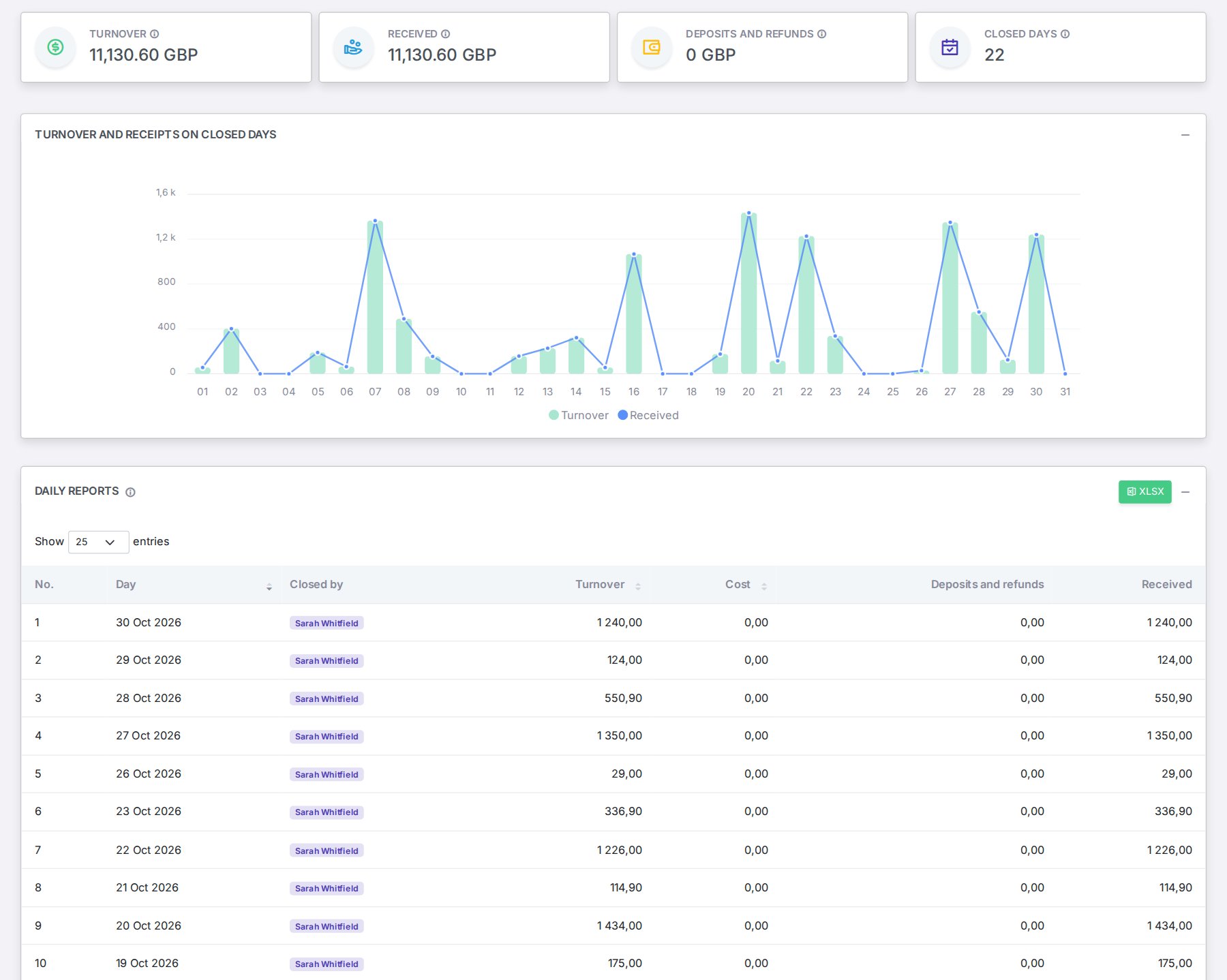
Daily reports are created automatically when a staff member closes the day: number of jobs, turnover and who closed the day. You can get the summary by text message, and every report stays in the system for comparisons.
Try it free for 14 daysWhat are Daily Reports?
Daily reports are a feature that automatically creates a summary of results every day after the workday is closed. The owner can review them in the system or receive them as an SMS – no matter where they are.
How does this feature work?
Daily reports are created automatically as a result of everyday operations – there is no need to create them manually. All it takes is for an employee to close the day in the system.
Closing the day
The employee ending their shift closes orders or moves the unfinished ones.
Report generation
The system creates a summary – number of orders, revenue, balance.
Automatic SMS
The owner receives a short summary on their phone.
Accountability log
The system records who was responsible for closing the day.
Access to history
Reports are stored in the Analytics module – for comparisons and analysis.
How does it look in the system?
Daily reports allow you to quickly summarize the day – totaling revenue, the number of orders and services performed.
Join more than 50 studios working with Bonaveo
Average Google rating of 5.0. The first 14 days are free, no card needed.
What do you gain with Daily Reports?
Daily reports were created for owners who want control over their results and team – without having to be present at the company every day. It is a feature that increases transparency and accountability.
Constant oversight of your business
You see the results every day – without logging in or making calls.
Faster settlements
You eliminate daily questions about turnover and the number of orders.
Greater team accountability
Each day is closed by a specific person, and the report records their name.
Full transparency of operations
You have insight into profitable days and those that need improvement.
Peace of mind and control
You know the system watches over your finances – even when you are resting.
Related system features
Daily reports work best together with these modules of the CRM for auto detailing.
Frequently asked questions
What are Daily Reports?
It is an automatic daily summary of your studio activity – the number of orders, visits, turnover and the person closing the day.
Are the reports created automatically?
Yes. The report is generated automatically after an employee closes the day in the system.
Can I receive the report via SMS?
Yes. The system can send an automatic SMS with the daily summary to the owner or manager.
Do I have access to the report history?
Yes. All daily reports are archived in the system and available for browsing and comparison in the Analytics module.
I have several locations. Will the reports show them separately?
Yes. You filter reports by location, so you see each site separately or all of them together.
Can I download the reports to Excel?
Yes. You can download the days of any period as an Excel file, e.g. for your accountant or your own summaries.
Run your studio like a leader
Create an account in 2 minutes and try Bonaveo on your own orders. If you prefer, we’ll show you the system live.
