







Know where your studio’s money goes and how much is really left
Record and control costs in one place. Data flows instantly to the Dashboard and Financial Analytics to reveal real profitability.
Sound familiar?
Receipts and invoices for products are in a drawer, in the car and on your phone.
You know your turnover, but not how much of it is left once costs are paid.
Expenses creep up bit by bit, and you only notice when money runs short in the account.
To add up the month’s costs, you spend the evening over a spreadsheet.
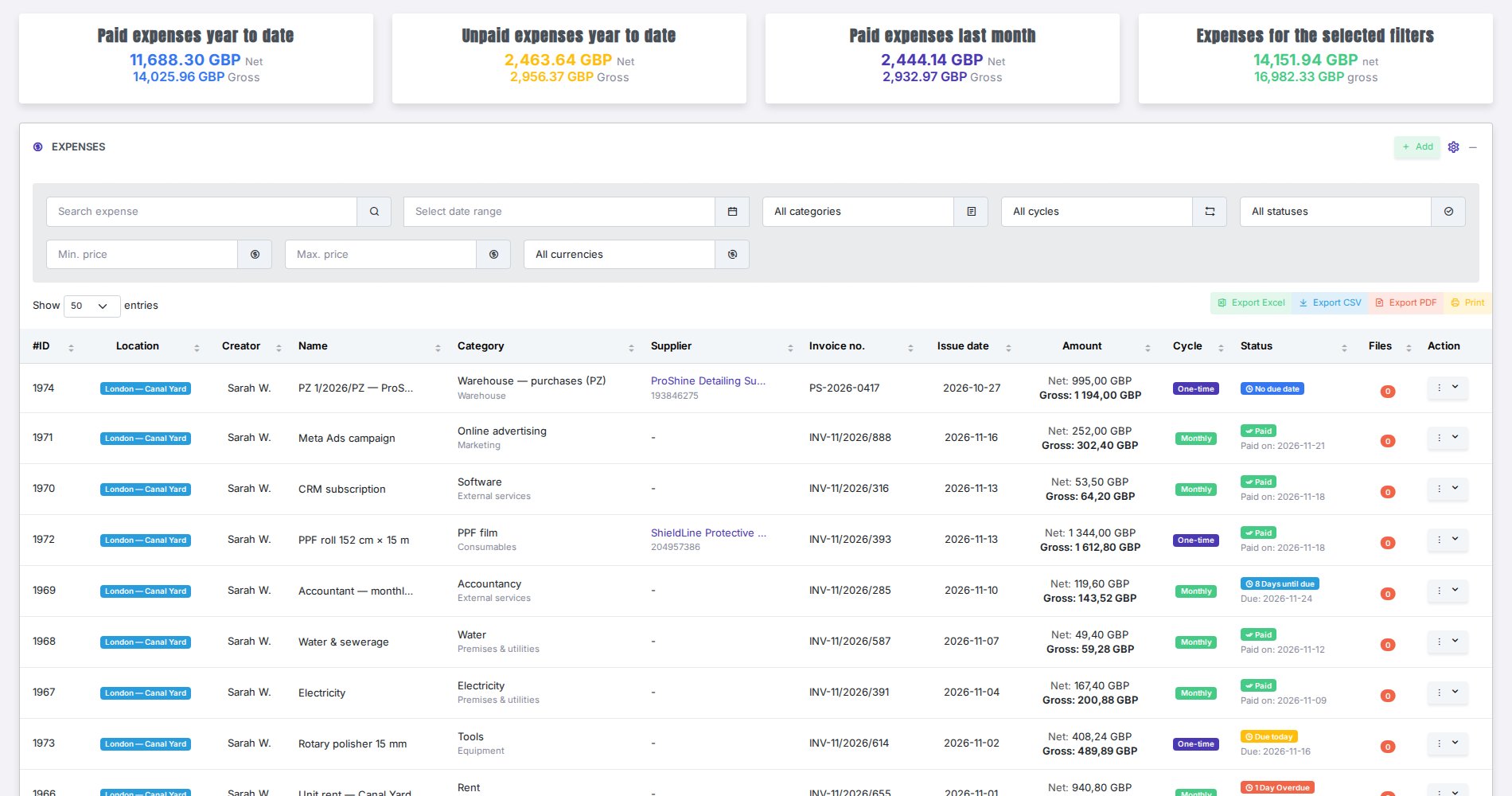
The expenses panel keeps all costs in one place, with categories, dates and people. Every entry goes straight to the Dashboard and Financial analytics, so you see costs next to revenue and your real profitability.
Try it free for 14 daysWhat is the Expense Panel?
It is a central place to manage costs: from buying chemicals and renting a unit, through fixed costs, to one-off expenses. The data is not siloed – it connects with the Dashboard and Financial Analytics, giving a full picture of your business.
How does the Expense Panel work?
It works like a smart cost ledger connected to the CRM modules. Every entry is categorized and automatically affects summaries and analyses.
Add an expense
Description, category, amount, date, person/area – all in one form.
Link with analytics
The entry automatically flows to the Dashboard and Financial Analytics.
Impact on metrics
Balance, margin and profitability update in real time.
Access permissions
Control who can add, edit and view costs.
Data-driven decisions
Identify where money leaks and optimize your budget.
How does it look in the system?
Clear expense management – recent invoices, payment statuses and a summary of company costs.
Join more than 50 studios working with Bonaveo
Average Google rating of 5.0. The first 14 days are free, no card needed.
What do you gain with the Expense Panel?
Many owners know their revenue but do not fully control their costs. The Expense Panel creates transparency, reveals where money is not working and lets you build margin consciously.
Full cost control
No more guesswork – a clear picture of expenses.
Costs vs. revenue
See whether your business generates real profit.
Better investment decisions
Know where to cut and where to increase the budget.
Higher margin
Optimize expenses and build profitability.
Smooth collaboration
Delegate cost entry without losing control.
Related system features
The Expense Panel works best together with these CRM modules for auto detailing.
Frequently asked questions
What is the Expense Panel?
It is an organized place to record and categorize company costs, integrated with the Dashboard and Financial Analytics.
Are expenses visible on the Dashboard?
Yes. Every entry automatically affects the totals, charts and metrics on the Dashboard.
Who has access to the costs?
Access is controlled by the User Permissions module – you can limit entry and viewing to selected roles only.
Can I categorize expenses by type?
Yes. You can create your own cost categories (e.g. chemicals, energy, rent, training) and filter reports by category.
Can I add an expense from my phone?
Yes. In the mobile app you add an expense right at the time of purchase, together with a photo of the receipt.
Can I attach an invoice and mark an expense as paid?
Yes. You attach files to an expense, such as an invoice or receipt, and mark it as paid, so you know what is still waiting to be paid.
Run your studio like a leader
Create an account in 2 minutes and try Bonaveo on your own orders. If you prefer, we’ll show you the system live.
