







Know what’s on your shelf and how much material every car uses
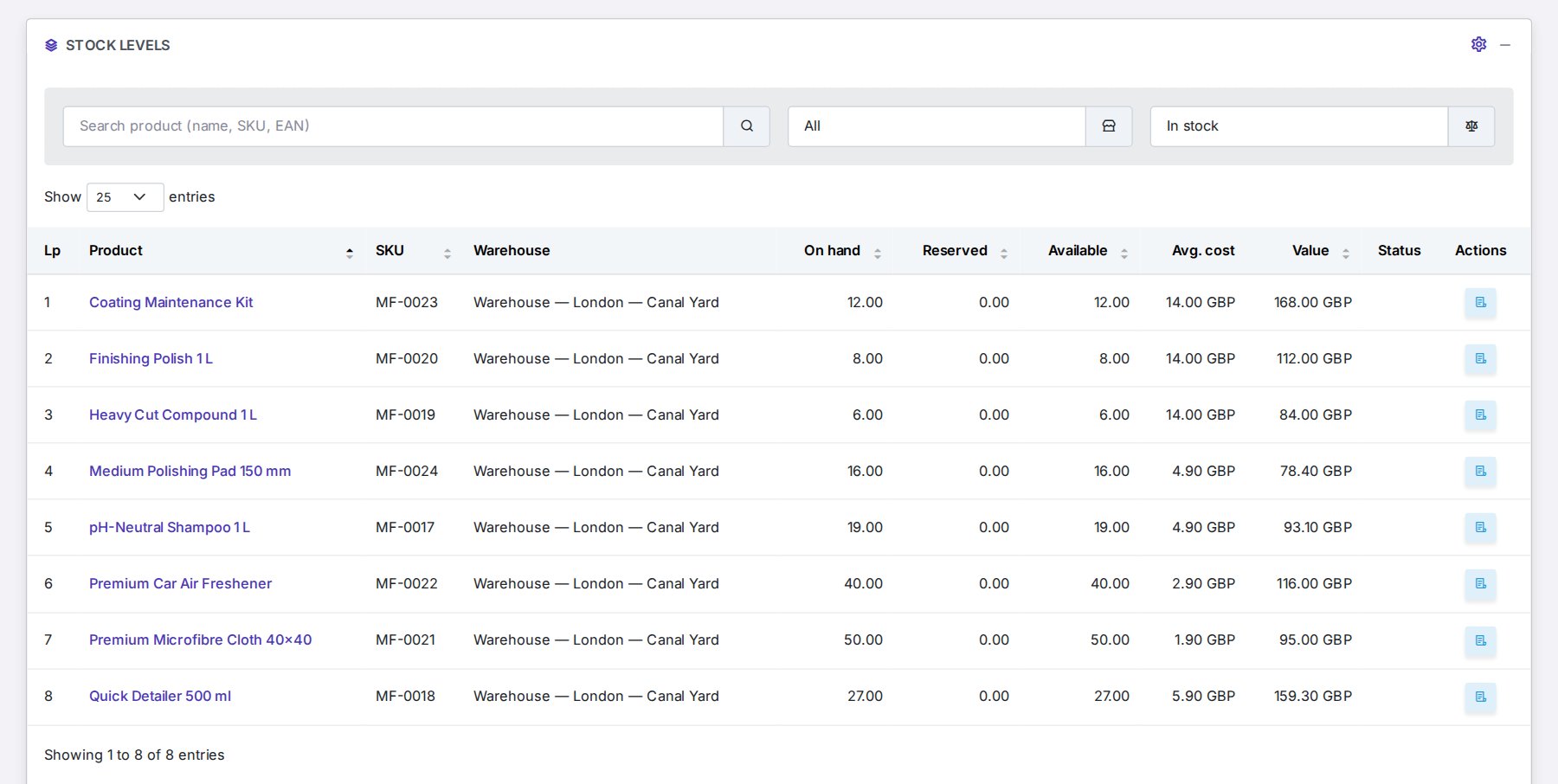
Know how much chemicals, film and materials you have on the shelf and how much goes into your orders. Receive goods from invoices, issue them to orders and run stocktaking.
Sound familiar?
Halfway through a coating you find the product has run out, and nobody noticed it getting low.
You don’t know how much material went into a specific car, so you don’t know if the job paid off.
You retype supplier invoices by hand, and the shelf count still doesn’t match.
Stocktaking means a day of counting on paper, while your accountant waits for the JPK_MAG file.
Stock management ties purchases, jobs and accounting together: you receive goods from the invoice, issue materials to a job, take stock with a printed count sheet and generate JPK_MAG for your accountant.
Try it free for 14 daysWhat is stock management?
Stock management is a complete warehouse module in the CRM: receipt and issue documents, FIFO stock valuation and the history of every product. You issue materials straight from the order, so you know what the job cost and what is left on the shelf.
How does stock management work in practice?
Each location gets its own warehouse, and you can add more. You create documents as drafts and approve them – only then do they change the stock.
Receipt from an invoice
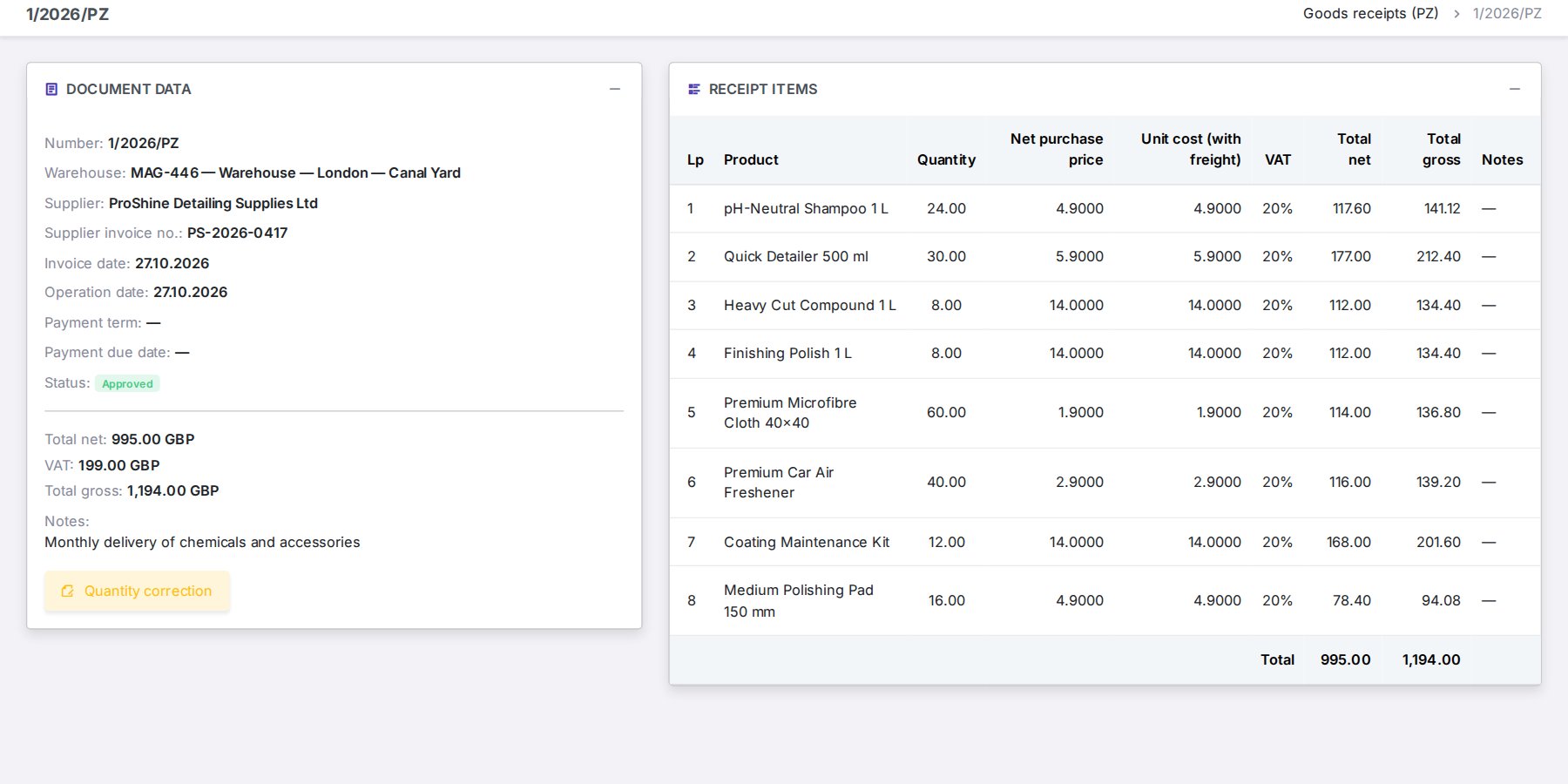
The goods-received document checks the invoice totals, spreads the transport cost and, once approved, creates an expense automatically.
Licence currency
Purchase prices are recorded in your licence currency, with no exchange-rate conversions.
Issue to an order
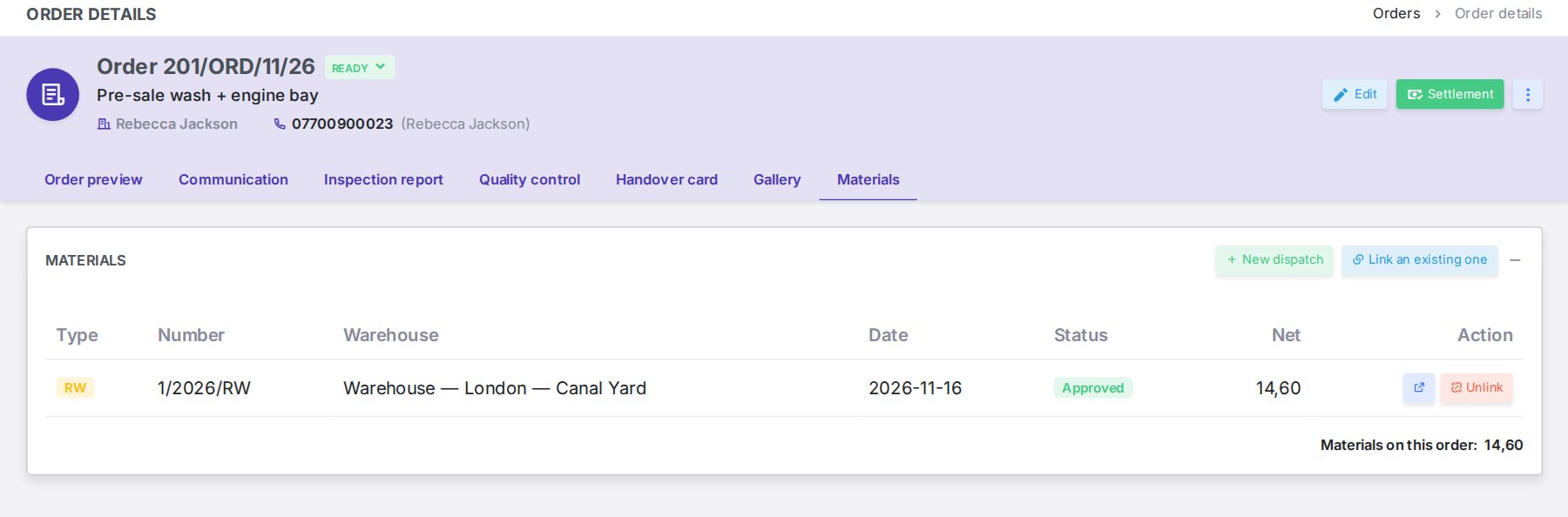
In the "Materials" tab of the order you issue products from the warehouse, and the document is linked to the order.
Transfers and reservations
Move goods between warehouses and reserve them for a specific issue.
Stocktaking
A printable count sheet, automatic differences and period closing that blocks backdated changes.
Stock documents
Every movement has its document: goods received, issue to an order, transfer between warehouses and stocktaking.
What does stock management look like in the system?
Product stock levels, warehouse documents and materials issued to an order.
Join more than 50 studios working with Bonaveo
Average Google rating of 5.0. The first 14 days are free, no card needed.
What do you gain with stock management?
Chemicals and film are among a studio's biggest costs, and without a warehouse it is hard to say how much material went into a specific car. The module brings purchases, orders and accounting together in one place.
Stock control
See what is running low before you run out mid-job.
Known material cost
FIFO valuation shows what the issued goods cost.
Less retyping
Receiving goods creates an expense in the system straight away.
Easy stocktaking
A physical count with a printout and automatic calculation of differences.
Warehouse on the order
Materials issued for a car are visible in the order details.
Permissions under control
Decide separately who creates and who approves documents.
Related system features
Stock management works best together with these CRM modules for auto detailing.
Frequently asked questions
Which warehouse documents does the system support?
Opening balance, goods received and internal receipts, issues (sales, internal and consumption), transfers between warehouses, reservations, stocktaking, corrections and reversals.
How is the cost of issued goods calculated?
Using FIFO – from the oldest receipt batches. You can also pick a batch manually and check the stock value for any date.
Can I issue materials to a specific order?
Yes. In the "Materials" tab of the order you create an issue document that is linked to that order.
Can I have more than one warehouse?
Yes. Each location can keep its own warehouse, and you transfer goods between warehouses.
Can I have several warehouses?
Yes. Each location gets its own warehouse, you can add more and move goods between them with a transfer document.
How do I start if I already have goods on the shelf?
You enter an opening balance – a document that sets the starting quantity of each product. From then on, receipts and issues count from that level.
Can I limit who approves documents?
Yes. Permissions to create, approve and cancel are set separately for each document type, so an employee can prepare a draft and a manager approves it.
Run your studio like a leader
Create an account in 2 minutes and try Bonaveo on your own orders. If you prefer, we’ll show you the system live.
