







Car ready? The client knows with a single click
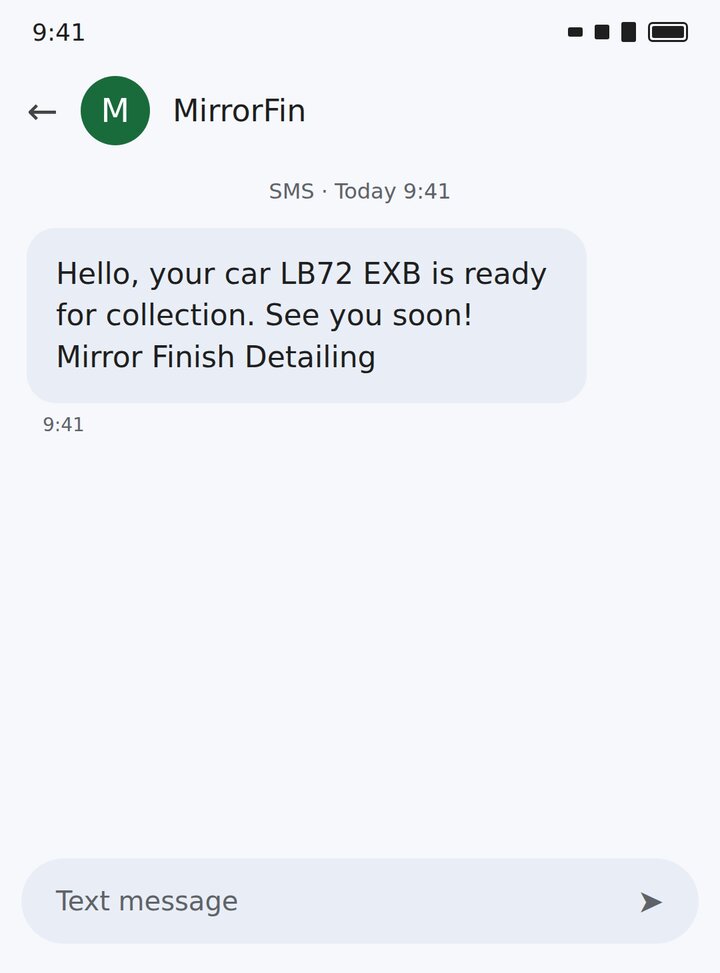
SMS notifications for the customer when their order is ready for collection.
Sound familiar?
The car has been ready since morning, and nobody has called the client.
You call the client, they don’t pick up — and you try three more times.
An employee texts from a private phone, with a typo in the car’s make.
The client calls every hour to ask whether they can come yet.
You finish the order, click “Send SMS” in the schedule or the order, and the client gets a message with the car’s make and the location straight away.
Try it free for 14 daysWhat is this feature?
The simplest way to wrap up a service: one click and the customer knows the car is waiting. No more phone calls, copying text, or the risk that someone forgets to call.
How does it work in practice?
An employee finishes the order, clicks "Send SMS", and the customer instantly receives the pickup notification. You set the message once and the system fills in the data automatically.
One click from the Schedule or the Order
No app switching — you send directly from the view you are working in.
Template + variables
Set a fixed message and use variables (make/model, address, phone) — consistent and typo-free.
SMS sending
On higher plans you can send an SMS with your own sender name for a stronger brand image.
Close-out and settlement
After sending you move straight to settling the order and payment — without unnecessary steps.
What does it look like in the system?
Automatic SMS notifications letting customers know their car is ready for pickup.
Join more than 50 studios working with Bonaveo
Average Google rating of 5.0. The first 14 days are free, no card needed.
What do you gain?
The customer gets a clear message at the right moment, and the team does not waste time on calls. Fewer mistakes, more professionalism and a faster close-out.
Time savings
One click instead of phone calls and rewriting messages.
Effective communication
A clear, quick SMS reaches the customer directly.
Fewer errors
The system suggests the correct contact assigned to the order.
Brand image
The sender name in SMS messages makes a difference in how communication is received.
Smooth settlements
After sending — payment and invoice right away, with no downtime.
Related system features
The car-ready notification works best together with these modules.
Frequently asked questions
How do I send a notification that the car is ready?
With one click from the Schedule or the Order Card. The message is sent by SMS.
Can the message content be edited?
Yes. You can use variables (e.g. customer name, make/model, location, pickup phone number).
Can I use my company name as the SMS sender?
Yes, on the Standard+, Premium and Custom plans you can set your own sender name.
Does the feature support settlement after sending?
Yes. After sending the message you can settle the order right away and choose a payment method.
Can I send this SMS from my phone?
Yes. In the Bonaveo mobile app you send the SMS from the order card — right by the car, without a computer.
Will you move my clients and their cars from Excel or another program?
Yes. At the start we move your clients and their cars from your spreadsheet or previous system, so you don’t start from scratch.
Run your studio like a leader
Create an account in 2 minutes and try Bonaveo on your own orders. If you prefer, we’ll show you the system live.
